

Thermaltake Elevates Customization with TT RGB PLUS 3.0 Software Update Enhanced control, expanded features, and richer personalization
【Press Release】
Thermaltake Elevates Customization with TT RGB PLUS 3.0 Software Update
Enhanced control, expanded features, and richer personalization
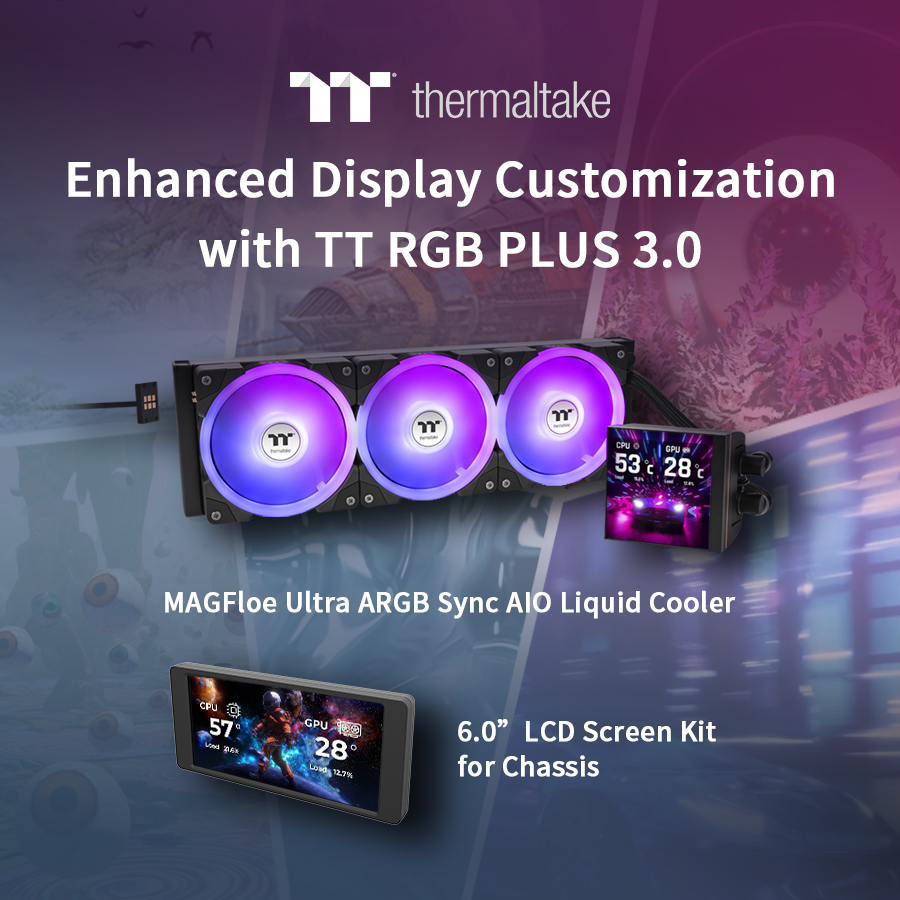
Cologne, Germany-August 23rd, 2025-Thermaltake, a leading PC DIY brand for premium hardware solutions, proudly introduces TT RGB PLUS 3.0, the latest version of its proprietary software suite for lighting control and real-time display customization. Designed for select Thermaltake products, TT RGB PLUS 3.0 delivers a completely refreshed user experience with more intuitive navigation, advanced personalization options, and smoother system integration.
Modernized Interface for Streamlined Control
TT RGB PLUS 3.0 sets a new standard for control software, with a modernized interface that puts clarity and ease-of-use front and center. Users can now access settings faster, apply visual adjustments with minimal effort, and manage multiple devices more efficiently, all within a sleek, responsive dashboard built for the next generation of PC builders.
Advanced LCD Customization Options
One of the most anticipated upgrades is the expanded customization capabilities for LCD displays. Users can fine-tune every detail of what appears on screen, from selecting system statistics such as CPU temperature or GPU load, to customizing the position and font color. This level of control transforms every screen into a uniquely styled performance dashboard.
Expanded Support for Thermaltake LCD-Equipped Products
TT RGB PLUS 3.0 offers full support for Thermaltake’s latest LCD-equipped components, including the LCD screen kits for select chassis as well as the MAGFloe Ultra ARGB Sync AIO liquid cooler. These products feature advanced built-in displays with sizes ranging from a 6.0 inch rectangular screen on chassis to a vivid 3.95 inch square LCD screen with 480 by 480 resolution on the MAGFloe Ultra. The screens connect directly to the software, enabling real-time monitoring of system statistics such as temperature, voltage, and frequency.
Personalized Visual Themes and Media Support
In addition to real-time hardware monitoring, the software enables users to upload their own visuals, including JPG, PNG, GIF, MP4, MOV, and AVI files, allowing for seamless content personalization. TT RGB PLUS 3.0 also introduces six default visual themes (Theme availability may vary by product) that serve as dynamic starting points for users to build on. Each theme is tailored to a different aesthetic:
• CityPunk – Urban cyberpunk with bold neon architecture
• WeirdCore – Dreamlike visual distortion with surreal effects
• VaporPunk – Retro-futuristic with analog textures and warm tones
• NeonPunk – High-energy motion and tunnel lighting
• Chinese Ink Painting – Subtle brushstrokes and calming greyscales
• Minimalist – Sharp, clean lines for a professional finish
Mobile Integration with TT PlayLink
To extend convenience beyond the desktop, the software is compatible with the TT PlayLink mobile app, allowing users to upload images or videos directly from their smartphones. Whether capturing live moments, adjusting content, or syncing media across devices, TT RGB PLUS 3.0 keeps personalization both powerful and portable.
Available Now with Wide Hardware Support
With this major update, Thermaltake empowers users to take greater control over their system aesthetics and information feedback, all while simplifying the experience across devices. TT RGB PLUS 3.0 is now available for download and supports a wide range of Thermaltake hardware, including AIO coolers, chassis screen kits, power supplies, and more.
【Thermaltake at Gamescom 2025】
Exhibition Period
n AUG. 20th, 9:00 AM - 7:00 PM
n AUG. 21st - 24th, 9:00 AM - 8:00 PM
Venue
n Hall 10.1, Booth D060, Koelnmesse – Cologne Exhibition Center, Messeplatz 1, 50679 Cologne, Germany
Event Info
n Thermaltake Facebook Page- https://www.facebook.com/ThermaltakeInc
n Thermaltake Instagram Page- https://www.instagram.com/thermaltake_global/
n Event Microsite- https://gamescom.thermaltake.com/2025/index.html
For more information on the MAGFloe Ultra ARGB AIO and 6.0'' LCD Screen Kit, please visit:
MAGFloe 360 Ultra ARGB Sync AIO Liquid Cooler
https://www.thermaltake.com/magfloe-360-ultra-argb-sync-aio-liquid-cooler.html
MAGFloe 420 Ultra ARGB Sync AIO Liquid Cooler
https://www.thermaltake.com/magfloe-420-ultra-argb-sync-aio-liquid-cooler.html
MAGFloe 360 Ultra ARGB Sync AIO Liquid Cooler - Snow Edition
https://www.thermaltake.com/magfloe-360-ultra-argb-sync-aio-liquid-cooler-snow-edition.html
MAGFloe 420 Ultra ARGB Sync AIO Liquid Cooler - Snow Edition
https://www.thermaltake.com/magfloe-420-ultra-argb-sync-aio-liquid-cooler-snow-edition.html
6.0'' LCD Screen Kit
https://www.thermaltake.com/6-0-lcd-screen-kit.html
MAGFloe Ultra Video:
MAGFloe Ultra ARGB Sync AIO Liquid Cooler – Redefine Your Display Experience
